What is PHP?
PHP is a programming language that runs on the server. WordPress is written in PHP: every time a visitor opens a page, the server runs the code of WordPress, your theme and your plugins to build that page. The PHP version installed on your hosting therefore has a direct effect on your site’s security and speed.
Why use an up-to-date PHP version
Each PHP version is maintained for about four years: two years of active support (bug and security fixes), then two years of security fixes only. After that, it receives no fixes at all.
- Security: an end-of-life version no longer gets patches. Vulnerabilities found after its end of life stay open.
- Performance: each new version brings optimizations to the PHP engine. The real gain depends on the site, but it is often noticeable on a WordPress site with many plugins.
- Compatibility: recent plugins and themes gradually drop older PHP versions. Staying on an old version eventually blocks their updates.
Which PHP versions are supported?
According to the official PHP calendar (checked on October 23, 2026):
| Version | Status | Security fixes until |
|---|---|---|
| PHP 8.5 | Active support | December 31, 2029 |
| PHP 8.4 | Active support | December 31, 2028 |
| PHP 8.3 | Security fixes only | December 31, 2027 |
| PHP 8.2 | Security fixes only | December 31, 2026 |
| PHP 8.1 and older | End of life | No more fixes (8.1 since December 31, 2025, 8.0 since November 26, 2023, 7.4 since November 28, 2022) |
A new version is released every year around late November. The current calendar is published on php.net.
Which PHP version for WordPress?
WordPress recommends PHP 8.3 or greater. It still works with PHP 7.4, but WordPress itself notes that these versions have reached their end of life and may expose your site to security vulnerabilities. For a production site, aim for an actively supported version (8.4 or 8.5), or at least a version that still receives security fixes, after checking that your theme and plugins are compatible.
Is there any risk in updating PHP?
Moving from one minor version to the next (8.3 to 8.4, for example) usually goes smoothly. A bigger jump, such as PHP 7.4 to PHP 8, can however break older plugins or themes that rely on removed functions. The risk is easy to manage with a few precautions:
- make a full backup of the site (files and database);
- update WordPress, the theme and the plugins before changing the PHP version;
- test on a staging site first when possible;
- keep the option to switch back to the previous version.
How to update PHP correctly
- Make a recent backup of your site.
- Check which PHP versions your host offers.
- Update WordPress, your theme and your plugins, and check their compatibility with the target version. Replace abandoned plugins.
- Change the PHP version in your hosting control panel (cPanel, Plesk, etc.), or ask your host to do it.
- Browse the site: main pages, forms, cart or checkout, and the admin area. Check the error log if something goes wrong.
How to check your site’s PHP version
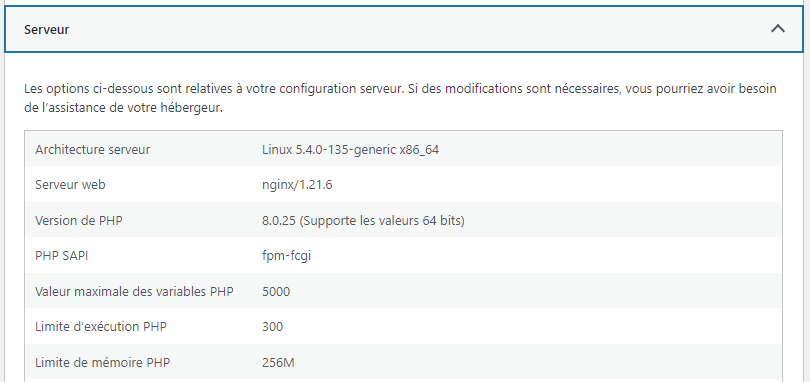
In the WordPress dashboard, go to Tools > Site Health, open the Info tab, then the Server section. The PHP version line shows the version in use. The Status tab of the same page also warns you when your PHP version is too old.
Should your PHP version be visible?
No. Some servers tell every visitor their PHP version, for example in the HTTP header X-Powered-By: PHP/8.1.29. This information is useful to no one, except someone looking for sites vulnerable to a known flaw. Hiding it is recommended, with the expose_php = Off setting in php.ini, or by asking your host to do it.
To find out whether your site shows it, you can check for free with Redirect Audit, which also analyzes your domain’s redirects and security headers.
Hosted with us?
We take care of moving your site to an up-to-date PHP version. We run the compatibility tests and can switch back to the previous version if a plugin is not compatible.
Your WordPress site deserves better?
Fast, secure, closely managed hosting.